Showing posts with label retro game. Show all posts

Tuesday, 14 March 2023

Dev Diary // Adventures with Tetris (C++ Console Window & FLTK)

A colleague introduced me to the YouTube channel javidx9 the other day with the video:

I sat down after a gym session one dreary monday night and the 36 minute video took me about 90 minutes but javid had delivered and there was Tetris in the console window in about 300 lines of code. I also really enjoyed the little maths trick he employed to rotate the tetromino pieces. I found the video to be a bit rushed in places and some things cut out so I had to refer to the github repo quite a bit. Some things also went unexplained and me from a few years ago would be quite confused but on the whole; a solid tutorial.

Tetris was on my list of games to clone as it's a classic, easy-ish to implement and rife for tinkering. And tinkered with that initial small program I have.

Console Window
Here is the repo for my "all-in-main" version that I wrote whilst following along with the video. It's not exactly as his code but close enough:

Dev Diary // Adventures with Tetris (C++ Console Window & FLTK)

++Console Window
I then set about taking this apart and creating a more generic Tetris that could eventually be run using any library. This one still runs in the console window but the input options, rendering, tetromino mechanics have been abstracted to work regardless of what library you're using....in theory.

FLTK
This is a small lightweight API  that I was introduced to whilst working my way through Principles & Practice. I actually really like it due to it's simplicity and Windows 95 looking graphics. This was the first test to see how portable I'd made my code in the previous exercise.

I started off modifying the wrapper code given in the book Programming: Principles & Practice by Bjarne Stroustrup. I've been meaning to do this for a while; it's not a perfect wrapper but it makes iteration in FLTK a bit faster.

Here's the repo:

With that done, I then found a free Tetris block png off the internet:

I used GIMP to change the hue of it to create 6 other colours.
Dev Diary // Adventures with Tetris (C++ Console Window & FLTK)

I then created a simple window with a quit button.

Dev Diary // Adventures with Tetris (C++ Console Window & FLTK)

Now I needed to find a way to display the Tetris Board on the window. At this point I already had all of the code needed from the console versions so I created a grey block and wherever '#' is drawn, I told it to draw a grey block instead.

Dev Diary // Adventures with Tetris (C++ Console Window & FLTK)

Next was to draw the current piece. This required some tweaking but after some trial and error I managed to get it working without having to expressly tell the individual blocks to draw to make up the shapes (it used the text created in the console versions).

Dev Diary // Adventures with Tetris (C++ Console Window & FLTK)


I then started copying over all the update logic to move and rotate the pieces. I was extremely surprised that this "just worked". FLTK does have it's own Keyboard event handling system however, the default windows one worked just fine with it so I stuck to that instead of changing it.

To create the "game loop", I used FLTK's timing system and registered a "tick" function with it. The tick function updates the Tetris board then redraws it. The tick function also handles updating the game tick counter to regulate tetromino speeds and locking them in place:

Dev Diary // Adventures with Tetris (C++ Console Window & FLTK)
Please ignore the flickering; FLTK and my screen recorder don't get along.

The only thing left after all this was to print out the score:

Dev Diary // Adventures with Tetris (C++ Console Window & FLTK)

And with that I got bored and got the itch to do something else. I will come back to this though as I'd like to do it in SFML next, add sounds and such. I was happy I managed to get a "game" of sorts working in FLTK though as that library is not built for games....and it really shows. It was fun creating helper classes though. I'd like to know why it's flickering so much once the screen gets really full. I think it'd be a good task to delve into Visual Studios performance profiling and debugging options.

EDIT 25/07/2023
I fixed the screen flickering:

Monday, 17 January 2022

LP's 12 Months of Games // Alien Invaders Part 2 [C++ & SFML]

Completed Independently

In part 1, I got a basic game loop going and you could shoot invaders as they descended upon you. In part 2 there's now shields, sounds and a flying saucer!

It's almost there but there's still some bugs and finishing touches such as:
  • Background music. The famous "dun dun dun dun" has not been implemented as I haven't managed to recreate the sounds to a satisfactory standard and increasing the step as you destroy invaders is a task in itself as I'm not a sound engineer person.
  • The arcade style surrounding and background as well as the CRT shader. A colleague showed me a different way to implement the disintegration effect using shaders so I'll be implementing that as well as messing around with some other shader effects.
  • 2 Player mode
  • Demo mode
  • Taito Cop Easter Egg
  • Different Invader shots. Right now they're all just using 1 shot and will fire every couple of seconds or so. That needs changing.
  • The flying saucer is every 3 seconds which isn't correct. I haven't figured out from the assembly yet though what the actual timing mechanic is for it to appear.
  • The Credit Inserted and Start Game animations haven't been created.
  • The states don't really play with each other nicely
  • Bugs
I'm shocked that the original developer managed to create this game in a year but not just the game; he also built the hardware that the game ran on. This is a level of engineering that I can only dream of reaching. 

Result:
LP's 12 Months of Games // Alien Invaders Part 2 [C++ & SFML]

It doesn't look like much but I'm quite proud of myself for sticking to a project and getting it to a somewhat finished state. That in itself is an achievement for me. I am feeling a bit burnt out on SFML though having done 5 back-to-back projects with it and I'm looking forward to a bit of Unreal and Blueprints for the next project.

This is far from over though. I have a new project now to recreate Space Invaders with as many APIs as I can. Making it that first time though is the kicker; now it's almost out of the way, I can focus on refining the code and then re-implementing it using other libraries.

Code:
https://github.com/l-paz91/AlienInvaders2/tree/main/AlienInvaders2

The code is quite honestly, awful in places lol. But I don't care. I think that's one of the hardest lessons I've learnt whilst doing this exercise; just do it and worry about how shit your code is when it's done. I do enjoy refactoring and optimising but they don't help you get a project finished.

Friday, 31 December 2021

LP's 12 Months of Games // Alien Invaders Part 1 [C++ & SFML]

Completed Independently

So the final game of "Beginning C++ Games Programming" by John Horton was a clone of "Space Invaders". I skimmed the first chapter of the project and he starts talking about Entity component systems, Factory class designs etc and I just completely zoned out and decided to make it myself. 

This took me a while as Back 4 Blood added an offline mode and there's nothing quite like hitting zombies with a baseball bat. Also the Witcher season 2 and Lost In Space season 3.

So anyway, I kept getting annoyed with myself whilst making this game; I was trying to make the code as beautiful as possible right off the bat; which is impossible unless your Bjarne or Scott Meyers or something. I asked many colleagues how they would go about implementing Space Invaders and amusingly, the more senior the engineer the more the answer became "just do it all in main, who cares?"

So, I've written some terribly hacky code that only gets worse as time goes on but I have a game! This is labelled part 1 because it's not finished however, there is a title screen, a game and a game over. It saves the high score between runs and loops after game over so it is a game...regardless of how finished.

I'm quite into the task now and the shields are ready to be implemented, as are the sounds. Then the flying saucer needs some attention as do the shot exploding animations but then I'll have a full Space Invaders clone!

I've given myself a few little extras that involve creating a CRT shader and making it look as though you're playing the game on an arcade machine.

Result:
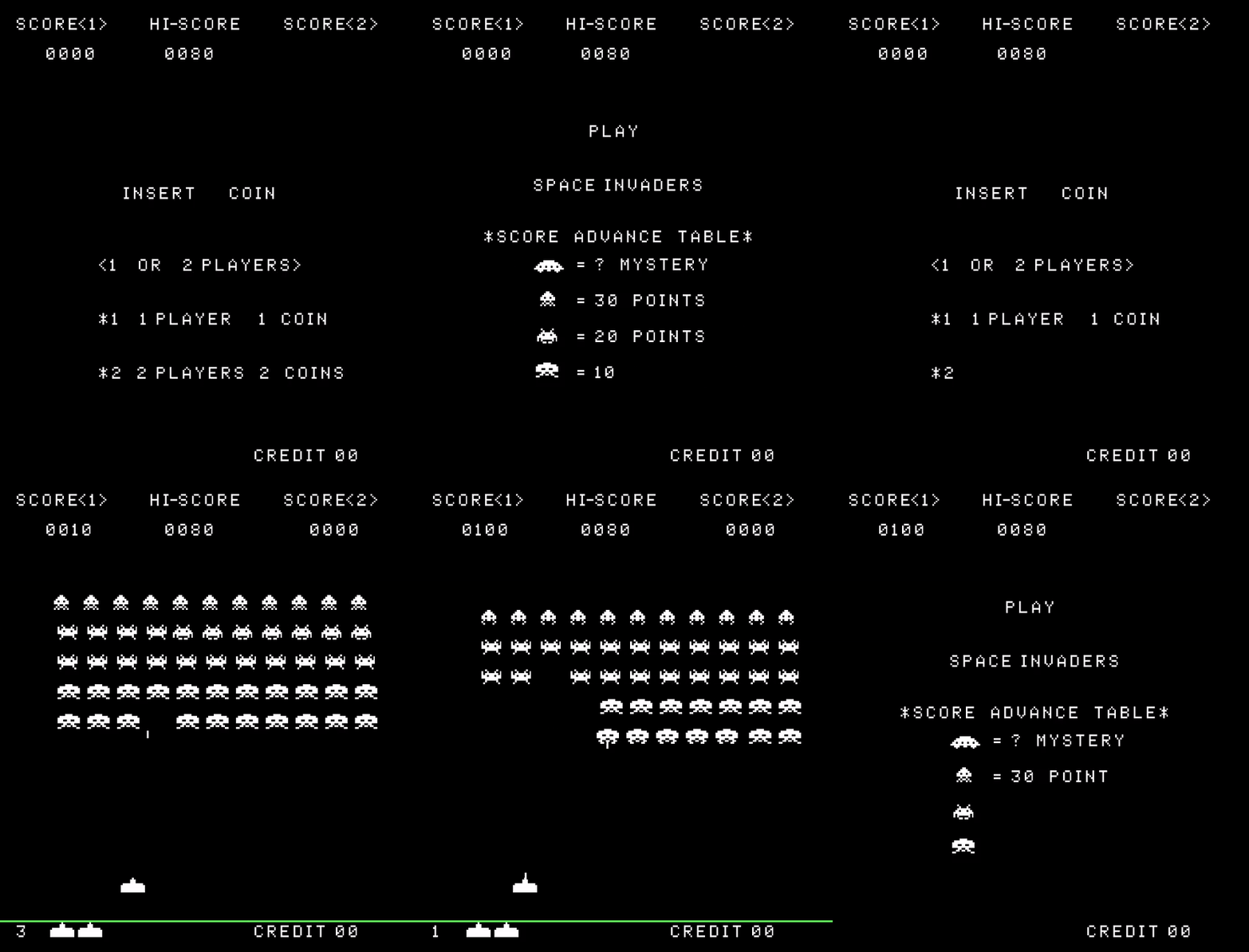
Space Invaders Clone Using C++ and SFML

I'm extremely happy with what I've done so far. I'm really trying my best to make it look and feel exactly like the original. I'm going so far as implementing the same bugs using this site which comments all the assembly:

There are some issues which you may have already noticed; my game over text isn't displaying and the high score isn't updating. That will be fixed next but the code is in place.

I just really wanted to get something uploaded for this month and I've already learnt so much from attempting to do this by myself. I'm glad I ignored the book as this game is deceptively hard but a great place to start when making a complete game from scratch for the first time.

I almost gave up a couple weeks ago as I find it difficult to find the motivation to finish things. I have about 70 started projects but I thought to myself, the whole point of this challenge is to get better at making games and I won't get better if I don't at least try! So I managed to scrape the code together enough to call it a "game".

It also made me realise that I hate UI programming with a burning passion.

Code: