Showing posts with label chapter 13 drills. Show all posts

Wednesday, 1 April 2020

Chapter 13 // Drill 5 - Principles & Practice Using C++

In this exercise I am using Visual Studio 2017 and the graphics files found here:
https://github.com/l-paz91/principles-practice/tree/master/Graphics%20Files

Chapter 13 // Drill 5

Add a 100-by-100 image. Have it move around from square to square when you click the "Next" button. Just put wait_for_button() in a loop with some code that picks a new square for your image.

Github: https://github.com/l-paz91/principles-practice/blob/master/Chapter%2013/Drills/Drill%205


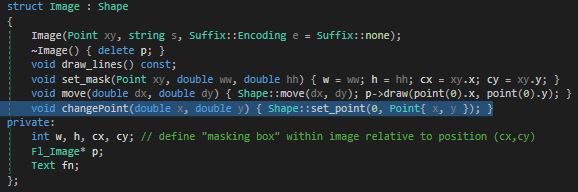
The move function doesn't actually do what I wanted it to do in this exercise as if you go look at it's implementation in Graph.h you'll see that it actually adds the given co-ordinates to the existing ones. I realised this when I was wondering where the image was while furiously clicking next; the x and y values were around 8000 and 9000 by that point. So instead, I just made a new function within the Image struct that allows you to re-set the points for the image. Shape has a set_point() function however it's protected which means that derived classes can only access it from within the class.


 (Imagine the doge jumping around...)


Tuesday, 31 March 2020

Chapter 13 // Drill 4 - Principles & Practice Using C++

In this exercise I am using Visual Studio 2017 and the graphics files found here:
https://github.com/l-paz91/principles-practice/tree/master/Graphics%20Files

Chapter 13 // Drill 4

Find a 200-by-200-pixel image (jpeg or gif) and place three copies of it on the grid (each image covering four squares). If you can't find an image that is exactly 200 by 200, use set_mask() to pick a 200-by-200 section of a larger image. Don't obscure the red squares.

Github: https://github.com/l-paz91/principles-practice/blob/master/Chapter%2013/Drills/Drill%204

.


Monday, 30 March 2020

Chapter 13 // Drill 3 - Principles & Practice Using C++

In this exercise I am using Visual Studio 2017 and the graphics files found here:
https://github.com/l-paz91/principles-practice/tree/master/Graphics%20Files

Chapter 13 // Drill 3

Make the eight squares on the diagonal starting from the top left corner red (use Rectangle).

Github: https://github.com/l-paz91/principles-practice/blob/master/Chapter%2013/Drills/Drill%203

I know he intended us using templates to draw the rectangles in this exercise. I now understand why the copy constructors in Shape had been deleted. However, I'm not going to use templates because they are slow and should only be used if absolutely necessary.

Chapter 13 // Drill 3 - Principles & Practice Using C++

Sunday, 29 March 2020

Chapter 13 // Drill 1, 2 - Principles & Practice Using C++

In this exercise I am using Visual Studio 2017 and the graphics files found here:
https://github.com/l-paz91/principles-practice/tree/master/Graphics%20Files

Chapter 13 // Drill 1 & 2

Drill 1 - Make an 800-by-1000 Simple_window.
Drill 2 - Put an 8-by-8 grid on the leftmost 800, 800 part of that window (so that each square is 100 by 100).

Github: https://github.com/l-paz91/principles-practice/blob/master/Chapter%2013/Drills/Drill%201%2C2

.